
Covey.
A gamified campus app that helps cultural RSO members build genuine connections through shared challenges and a family point system.
Team

Katie D.

Josh S.

Nene M.

Paige S.

Alex L.
Timeframe
Jan - Jun ‘26
Tools
Figma
User Research
Context
Cultural Registered Student Organizations (RSOs) at the University of Washington aim to foster community and belonging on campus through shared cultural experiences, identities, and interests. Our initial research focused on identifying ways these organizations could design more engaging events while also creating low-pressure opportunities that encourage meaningful member connection and participation.
Design Question
How might we leverage storytelling to design cultural RSO events that build genuine connections between UW undergraduate students?
User Interviews
Through our initial user interviews conducted in HCDE 302, we identified five recurring themes shared among our participants regarding their experiences with Cultural RSOs. These themes included limited time availability, lack of positive first impressions and experiences, barriers to forming connections, joining organizations primarily for cultural exploration, and the importance of building rapport. Using the insights gathered from these interviews, we developed both a user persona and a journey map to better understand the needs and experiences of our target users.
Competitor Analysis
To better understand how students currently discover and engage with Cultural RSOs at the University of Washington, our team conducted a technical analysis of several existing systems and experiences, including Instagram, HuskyLink, tabling in Red Square, and the Student Activities Fair.
Across these analyses, we identified several recurring themes and challenges. Many platforms prioritized logistical information and large-scale outreach, but often lacked opportunities for meaningful connection, storytelling, and low-pressure engagement. Students frequently experienced information overload, difficulty discovering new organizations, surface-level interactions, and uncertainty about whether they would feel welcomed within a community.
At the same time, we found that low-barrier entry points, visual communication, peer-to-peer interaction, and authentic student experiences were highly effective in encouraging participation and fostering belonging. These findings reinforced the importance of designing a solution centered around community-building, cultural humility, and approachable storytelling.
User Personas


Journey Map

ideation
Initial Design Ideas
To begin the ideation process, each team member independently developed initial design ideas before sharing them with the group. These concepts were influenced by our user research and our goal of creating solutions that lower participation barriers and encourage meaningful connections within cultural RSOs. After presenting our individual ideas, we discussed each concept and evaluated them based on factors like impact and alignment with user needs. Through this process, we selected three ideas to continue developing: the member matching system, engaging name tags, and the cultural activities kit. These concepts became the foundation for next stage of design exploration.
Sketches

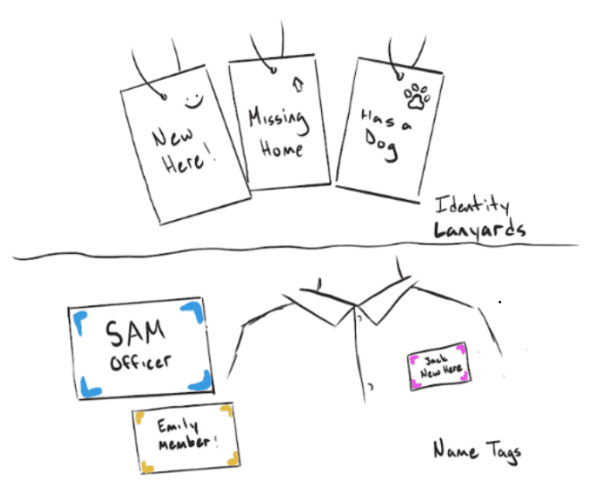

Our team developed design sketches to explore different directions for our concept and identify possible solutions. These early idea helped us visualize how the concepts could function and how users might interact with the activities. We each developed sketches individually before presenting them to each other, so we could consider different approaches to the format, features, and user needs before developing them further through storyboards and testing.
Storyboard
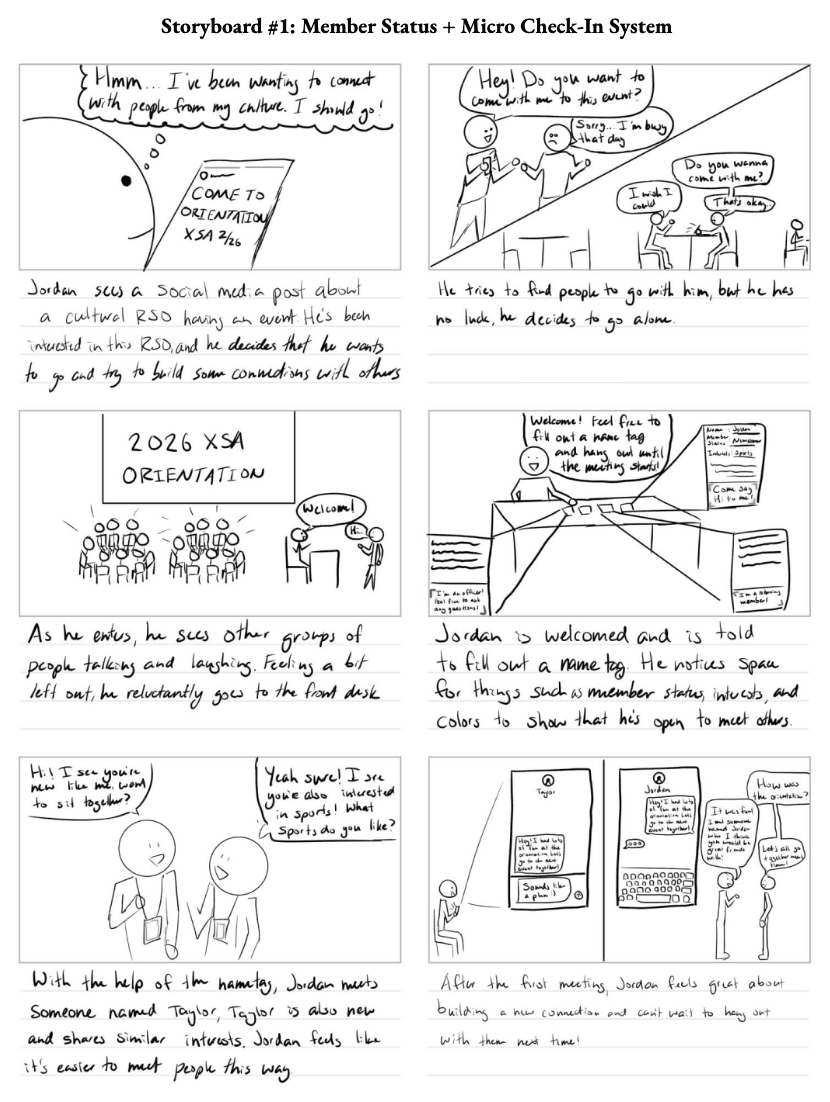


Our storyboards were created to support ideation and explore how students might experience and interact with our concepts. Each storyboard helped us evaluate how our concepts could encourage meaningful connections within cultural RSOs. We could look beyond features and focus on the overall user journey, including how they engage with the concept, their emotions, and if they could build connections. This allowed us to identify strengths, potential challenges, and opportunities for improvement. Based on our user research, we developed the following:
Design Requirements
Alleviate and reduce pressure in social situations to build genuine relationships between members of a cultural RSO.
Facilitate storytelling opportunities to foster authentic connections between RSO members.
Promote cultural understanding within food, traditions, games, experiences and language inclusivity during RSO gatherings.
Encourage newer members to return after attending their first event.
Minimize the time commitments of students through flexible engagements.
Design Goals
Accessible, welcoming communities that potential members can be a part of and contribute to.
Reduce burden and support practices to avoid burnout while keeping experiences fresh.
Build genuine, authentic relationships with others in the same culture RSO.
PROTOTYPING
Information Architecture
In order to get started with prototyping, we first established a framework for how users would navigate through our project.

User Flow
We designed the app's user flow around conventions borrowed from popular social media platforms, lowering the learning curve for new users by grounding navigation in familiar patterns. This allowed us to focus users' attention on what was genuinely new, the challenges system and group pages, rather than asking them to adapt to an unfamiliar interface at the same time.

Low-Fidelity
Concept Testing


Feedback
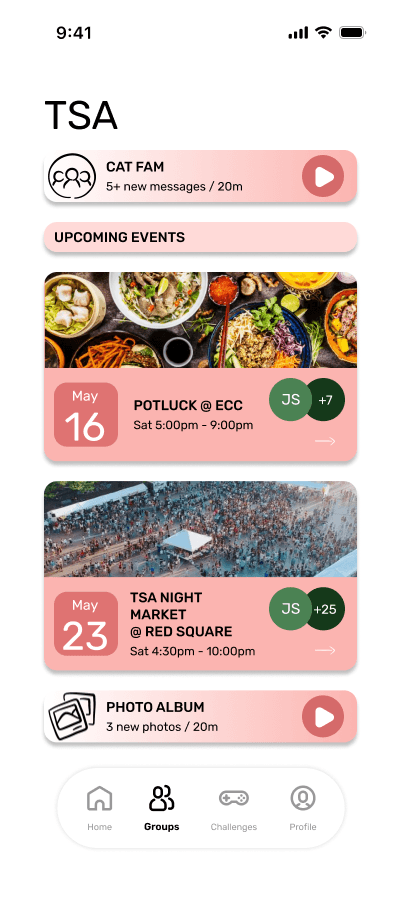
From our concept testing, we decided to focus on three main flows for the mid-fidelity changes, drawn directly from our highest-priority findings. We narrowed our scope to onboarding and rules orientation, the Family Points bar and challenge sections, and challenge status and completion verification. We also removed the explore feature to streamline the app's functionality and keep iteration focused on the interactions users found most problematic.
Mid-Fidelity


Usability Testing
After developing our mid-fidelity prototype, we conducted usability testing with three participants to evaluate whether users could understand and navigate Covey’s flow.
Participants mainly completed 3 tasks:
1
Posting an activity to the feed.
2
Engaging with another post.
3
Browsing challenges for a family activity.
All participants successfully completed all three tasks, giving us a 100% task completion rate. The prototype received a SUS score of 75.83, suggesting above-average usability. Participants liked the visual style, onboarding, and familiar social media layout. However, users were confused by the overlap between the Feed, My Group, Challenges, and point system. Task 3 took the longest, showing that the challenge flow needed more clarity. In response to these findings, we clarified navigation, refined challenge language, added more social context, and made the point system easier to understand for the high-fidelity prototype.
Card Sorting Activity
We also conducted a card sorting activity as part of our Usability Testing Report to understand which challenges users would want to complete with their RSO family. The results showed that users preferred casual, low-pressure activities such as getting dessert, going to a general meeting, trying cultural food, having a picnic, and doing snack-related activities. More involved activities, such as filming a music video, hosting a talent show, or completing consecutive hangouts, received more mixed reactions. This helped us prioritize more approachable challenge options in the high-fidelity prototype while still keeping some higher-effort challenges for more active families. Overall, the card sort reinforced that Covey should support different levels of participation.
Expert Review
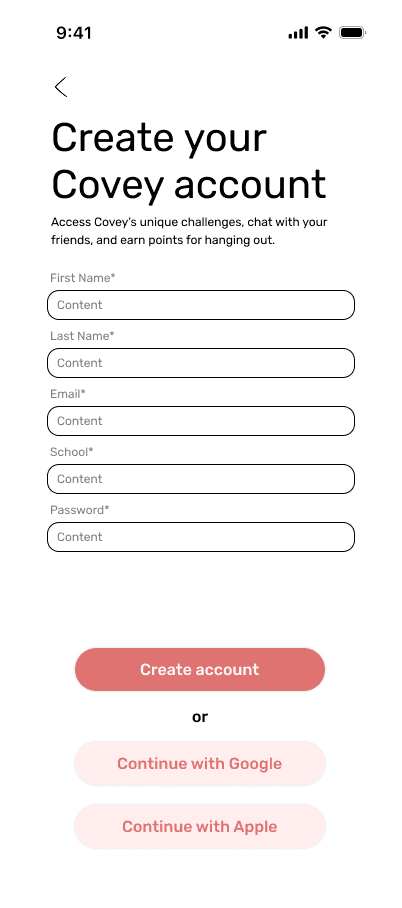
After developing our mid-fidelity prototype, we received expert feedback on Covey’s onboarding, feed, challenge system, and group experience. Reviewers encouraged us to focus on the first-time user experience, clarify how users are matched into families, and make the point system more meaningful. One of the most important pieces of feedback was that the onboarding needed more structure. Free form answers could make matching difficult, so we prioritized selectable inputs such as drop-downs or tags. Reviewers also suggested adding a “You got matched because...” explanation to help users understand why they were placed in a specific family.
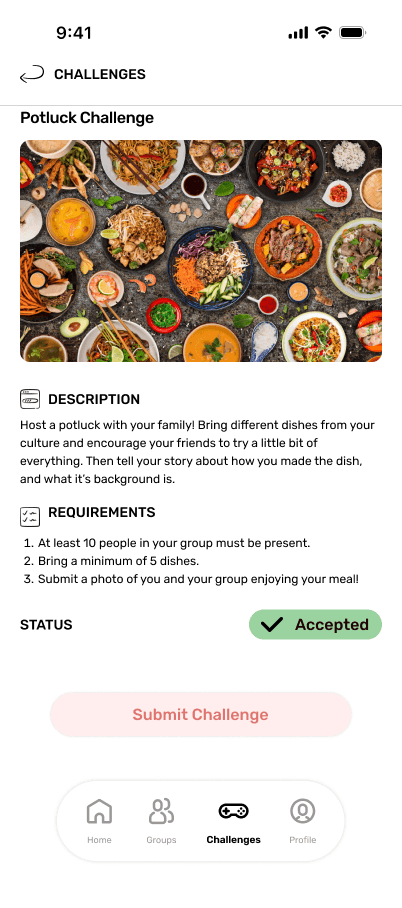
Reviewers also noted that the leaderboard and challenge system needed clearer motivation. The point distribution system was unclear, and the “Submit Challenge” button did not clearly communicate the user’s action. In response, we planned to add point milestones, clearer challenge statuses, and a “Complete Challenge” button. This challenge helped us prioritize changes for the high-fidelity prototype, including clearer onboarding, more meaningful points, group voting for challenges, member profiles, and stronger labels throughout the app.
High-Fidelity
Changes Implemented
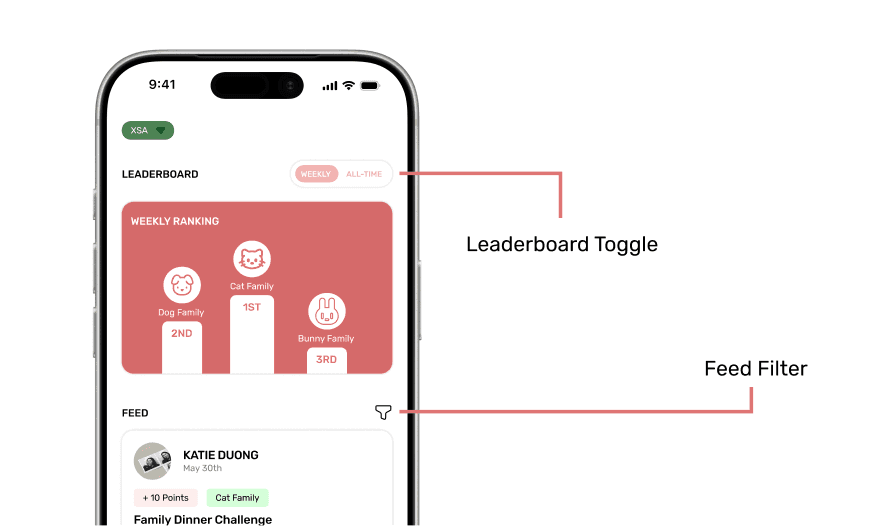
Feed and Leaderboard
The leaderboard was separated into podium-style component with a Weekly/All-Time toggle at the top of the Home screen, and the feed became its own dedicated scroll with a filtering component.

Challenges
Weekly challenge cards gained images and clearer point badges. The detailed screen added a status indicator. A full submission screen was added, requiring a photo upload and friend tagging.

Groups
We improved the hierarchy by emphasizing distinct sections: a group home showing upcoming events, a group chat screen, and a photo album with a scrollable grid. Event detail screens now show descriptions, requirements, and attendee profiles.

Profile
We added a full profile screen with an avatar, username, biography, interest tags, and a photo grid of past challenge posts. A Settings and Account screen was added with account options, Help Center, and a Switch Account panel supporting multiple RSO memberships.

Design Specifications
Typography
Typographical Hierarchy
Title - Rubik (40 pts)
Heading 1 - Rubik (26 pts)
Heading 2 - Rubik (22 pts)
Body Text (Content) - Helvetica (12 pts)
UI Typographical Specifications
UI Text (Medium) - Rubik (16 pts)
UI Text (Small) - Rubik (12 pts)
Color Palette

Reflection
Over the past two quarters, our team has worked to design Covey, beginning from ideas and concepts to high-fidelity screens and demo videos. During HCDE 302, we focused on learning about our users and developing initial concepts. Although we ended up pivoting from our project declaration concepts from 302, we were still able to build on our foundations from 302 in 303, working to design and iterate screens, moving from low fidelity sketches and wireframes to high fidelity screens with components and interactive prototyping. Our pivot allowed us to start fresh and approach our problem space from a new perspective.
Throughout the process, constant feedback from our professor and teaching assistants pushed us forward to refine and improve on our work. Additionally, the expert reviews allowed us to gain an outside perspective on our work and gave us direction in which to improve our work.
As a team, we learned to work together effectively, improving our communication, teamwork, and delegation skills. Moving from 302 to 303, we maintained our teamwork environment, creating shared files and folders to organize our work and collaborating efficiently inside and outside of class, In the end, we made a product we were proud of!